Everything your guests need. Nothing they don't.
One tap on an NFC (Near Field Communication — the same tap technology behind Apple Pay) tag. No app to download. No account to create. Your guests get an interactive, searchable, always-current venue map—loaded with the features below.
Three seconds from tap to map
No training. No instructions. No friction. Here's what your visitors experience.
Tap or Scan
Guest holds their phone near an NFC tag—or scans the QR code you place alongside it. Works with every modern smartphone.
Map Appears
Your custom venue map loads instantly in the phone's browser. No app store. No login. No permissions. Just the map.
Explore & Navigate
Guests search for locations, filter by category, check schedules, read announcements, and find their way—all from the map they already have open.
A venue experience that feels like a product
These aren't wireframes or roadmap items. Every feature below is live in production and working at real venues today.
Interactive Venue Map
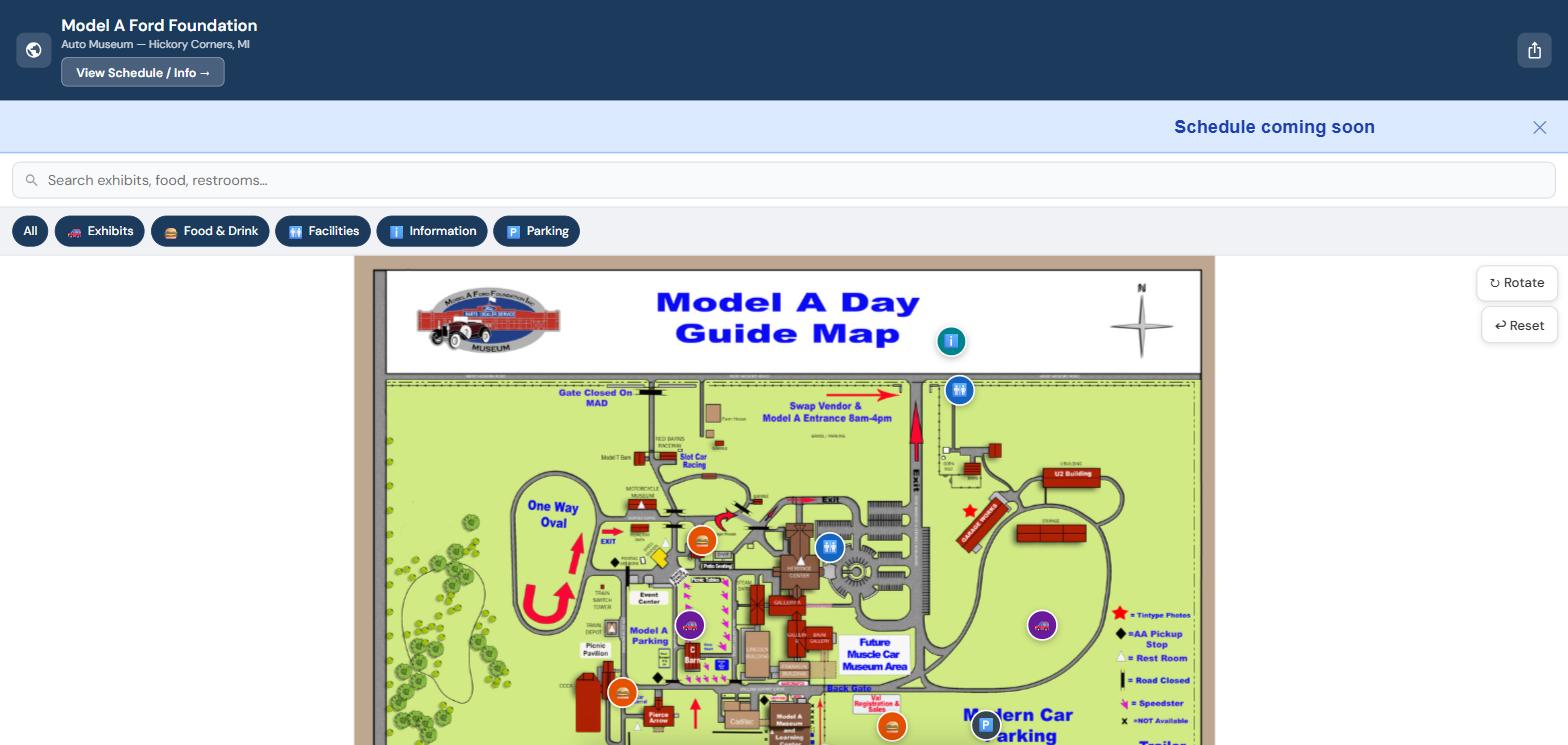
Your map isn't a static image—it's a fully interactive, zoomable, pannable experience built on an open-source mapping engine. Guests pinch-zoom into details, pan across your grounds, and tap markers to learn about each location. Optimized for outdoor use with high-contrast rendering that stays readable in direct sunlight.
Points of Interest
Every important location on your map gets its own interactive marker. Guests tap a marker to see the name, description, category, and floor location. POI (point of interest) cards expand with full details—no tiny tooltips, no squinting.
Category Filtering
Filter chips at the top of the map let guests show only what they care about—food, restrooms, stages, exhibits, parking, or any custom categories you define. One tap to filter, one tap to clear.
Smart Search
Live search with instant results as guests type. Matching text highlights in bold. Keyboard navigation with arrow keys. The map pans and zooms directly to the selected result. Search activates automatically for venues with 5 or more locations.
Interactive Schedule
Show times, tour schedules, feeding times, live music—anything with a time and place. Guests tap a schedule entry and the map pans directly to that location with the marker highlighted. Schedule content updates instantly when you upload a new version.
Scrolling Banners
Announce weather delays, gate changes, special offers, or safety alerts in a scrolling marquee at the top of the guest map. Four banner types—info, warning, alert, and promo—each with its own color and urgency level. Set start and end times so banners appear and disappear automatically.
You Are Here
Each NFC tag knows its own location. When a guest taps, the map opens centered on that spot with a pulsing "You Are Here" marker and a Nearby panel showing the closest points of interest. No GPS. No permissions. Just context.
Multi-Map Layers
Venues with multiple areas, floors, or contexts get a layer switcher—chip bar buttons that swap between maps without reloading the page. Indoor and outdoor areas, different buildings, event zones, seasonal layouts—each layer has its own map, POIs, and content.
Works Offline
Once a guest loads your map, it's cached on their phone. Spotty signal in the back field? Underground exhibit hall? The map keeps working. No cell service required after the first load.
QR Code Companion
Every venue gets a QR code to print from the client admin panel. Older phones or cautious guests who prefer to scan instead of tap get the same full experience. Same URL, same map, same features—two ways in. See the full comparison →
Accessible by Default
WCAG 2.1 AA (the international accessibility standard) compliant. Keyboard navigation throughout. Screen reader support with ARIA labels (screen reader accessibility tags). Focus-visible outlines. Skip links and semantic landmarks. Every guest navigates your venue, regardless of how they use their phone.
Marker Clustering
Venues with dozens of locations stay clean and readable. At zoomed-out views, nearby markers group into numbered clusters. Zoom in and they fan out to reveal individual locations. No clutter, no confusion.
Multi-Floor Navigation
Buildings with multiple levels get a floor selector bar. Guests tap a floor and only that floor's markers appear. Deep-linkable—an NFC tag on the second floor opens the map to the second floor automatically.
Privacy your guests can trust: TapTheMap collects zero personal data. No cookies. No login. No location tracking. No third-party scripts watching your visitors. Analytics are aggregate only—view counts and peak days, never individual tracking. Your guests get a tool, not a surveillance product.
A selling point for your vendors: Every vendor space appears on the digital map that guests see when they walk in. Vendors can be listed by name, making their booth discoverable through the search feature. Use map inclusion as a value-add when renting booth space.
A control panel that makes updates effortless
You shouldn't need a developer to update a banner or swap a map. TapTheMap's admin tools are built for venue operators, not engineers.
🛠 Admin Dashboard
Upload maps, manage POIs, edit categories, set banners, and preview what guests see—all from a browser-based control panel. For multi-vendor venues like swap meets and markets, update your vendor directory and booth layout before each event.
📅 Scheduled Uploads
Schedule map and content swaps in advance. Seasonal maps, event-day layouts, or weekend vs. weekday configurations—set the date and it happens automatically.
🔄 Unlimited Map Updates
Upload a new map anytime through your admin panel. Changes go live in seconds. There is no limit on how often you can update — even weekly. Running a swap meet with a different vendor layout each week? Upload the new map on Friday, and Saturday's guests see the latest layout.
📈 Analytics Dashboard
See how guests use your map: total views, peak days, NFC vs. QR scan splits, and engagement trends. Privacy-respecting, aggregate-only data powered by Plausible. Included on Growth and Campus. Starter can add the dashboard for $15/month.
📧 Visitor Email Capture
Optional opt-in form lets guests sign up for your mailing list right from the map. CAN-SPAM (the federal email marketing law) compliant. Export subscribers as CSV (spreadsheet file) anytime.
🔖 Tag Registry
Track every NFC tag you've deployed: where it's placed, what it's linked to, and what action it triggers. Printable placement guide with numbered markers.
👥 Multi-User Access
Add team members with role-based permissions. Viewers, editors, and admins each see only what they need. Seat limits scale with your plan tier.
🔔 System Banners
Post maintenance notices or outage alerts that appear across all venues. Four urgency levels with automatic time-windowed display.
🔁 Visual Point-of-Interest Editor
Drag-and-drop marker placement on your map. Grid overlay with snap-to-grid for precise positioning. Assign categories, descriptions, and floor numbers visually.
💬 Feedback System
Built-in feedback form for guests and staff. Four categories, admin dashboard with filtering, status tracking, and notes. Rate-limited to prevent spam.
Built for real venues, not slide decks
No app fatigue. Most visitors will not download a venue app. TapTheMap sidesteps the problem entirely—a web page loads in seconds with no store, no account, and no storage eaten on their phone.
What we're building next
TapTheMap is actively developed. Here's a look at what's coming in the next few quarters.
Kiosk Display Mode
A dedicated full-screen display mode for venue terminals and check-in stations. Visitors walk up, see the map, and orient themselves without needing to pull out their phone.
Campus Edition
Multi-building, multi-floor wayfinding for universities, hospitals, and corporate campuses. Searchable directories, floor switching, and context-aware NFC tags that know which building you're in.
For IT Teams & Enterprise Buyers
On-Premise Deployment
a self-hosted version you can run on your own network for organizations that need their data on-site. HIPAA and FERPA (federal privacy laws for healthcare and education) ready. Everything runs on your own hardware—no cloud dependency.